Notice
Changes to DEFT digital payment methods
Credit and debit card payments will no longer be accepted on deft.com.au from 1 October 2026, in response to upcoming legislation prohibiting merchant card surcharges.
What’s changing
- In preparation for new legislative requirements surrounding merchant card fees coming into effect on 1 October, Macquarie Bank is evolving the payment options available on DEFT to focus on fast, fee-free methods.
- From 1 October 2026, you’ll no longer be able to make payments on deft.com.au using a credit or debit card.
- Any payments you may have already scheduled from 1 October 2026 will be cancelled on this date.
But don’t worry, plenty of digital payment options remain.
Your payment alternatives
- Direct Debit — select 'Bank Account' as the payment method
- PayID using your deftreferencenumber@deft.com.au
- BPAY with the DEFT Biller Code
- Bank account payments via deft.com.au
- Australia Post (cheque or EFTPOS)
What payment options do I have?
1. Set up Direct Debit payments
We can initiate direct debit payment of your levies, so you never miss a fee notice or due date again.
When you set it up, select ‘Bank Account’ not ‘Card’ as the payment method so it will work after October 1.
Already using Direct Debit? Update your payment method to ‘Bank Account’ to ensure it keeps working after October 1.
2. PayID®
PayID is a fast and easy way to pay your bills. Make instant, fee-free payments via mobile or internet banking using the email address <deftreferencenumber>@deft.com.au.
Note: If PayID is not shown on your payment slip, you can still pay using PayID. Simply replace <deftreferencenumber> in the PayID email address above with the reference number shown on your payment slip. See the image below to find your reference number.
3. BPAY®
4. Deft.com.au
5. Pay in store at Australia Post
Reading your payment slip
The payment slip is found on the bottom of the first page of your fee notice, outlining your payment options.
Highlighted below is where to locate the information needed to easily process a payment via the above listed options.
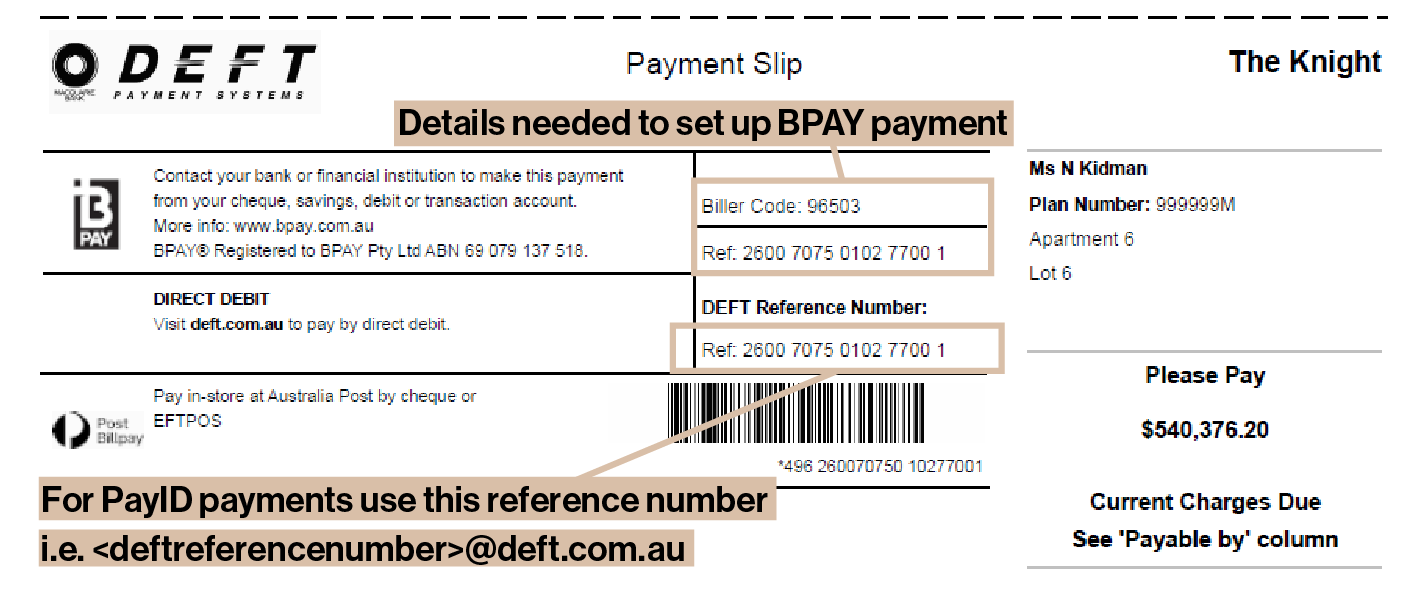
The payment slip is found on the bottom of the first page of your Levy Notice
Why have these changes occurred?
From 1 October, legislation will come into effect which prohibits businesses from charging customers a surcharge on card payments.
As a result, Macquarie is evolving the payment options available on DEFT to focus on fast, fee-free methods, and removing the option to pay by card.
Learn more
→The benefit to you.
The surcharge was previously added as a percentage on top of your owing fees, when you chose to pay by credit or debit card via DEFT.
All the remaining payment options listed above are fee-free, meaning you will pay less on each levy payment you make when compared with using a card.
You can find your reference numbers on your payment slip. Questions? theknight@theknight.com.au · 03 9509 3144.
Updated August 2026